Community guides
Announcement Groups by Text: How to Send One Message to Everyone, Flip Phones Included

An announcement group is a list where one person, or a few admins, send and everyone else receives, with no reply-all and nobody's number on show. For a list that includes flip and kosher phones, the announcement has to arrive as an ordinary text, and two kinds of service do that: a broadcast tool, which sends each person a separate text from a website, and a group line with an announcement setting, which gives the list its own number that admins post to from any phone. Moiduah is a broadcast tool built for community organizations. Klal Chat, which publishes this guide, is a group line: announcements carry the admin's name, members join and leave by text, and replies can go to the admins only. Choose by who sends, where replies should go, and whether the list may one day need to talk.
What is an announcement group?
An announcement group is a list where one person, or a few admins, send and everyone else receives. A school office telling parents about early dismissal, a camp telling families the bus is late, a team moving practice, a building telling residents the water is off: the message goes to everybody, and the answers do not flood everybody else.
Different tools call it different things. WhatsApp communities have an announcement group, where members' replies sit tucked under each update. Schools call it a text alert list, marketing software calls it a broadcast or a text blast, and plenty of people just say a one-way group text. The tools handle replies differently, but the job is the same: one message, every phone, no reply-all storm.
By text, the job has one requirement that apps do not have: the message must arrive as an ordinary text message, because that is the one thing every phone on the list can receive. That includes flip phones, kosher phones, and the phone of the member who has never installed an app and never will.
One-way, replies to the admins, or open: which does your list need?
Before choosing a tool, decide what a member's answer should do. There are three shapes, and most lists need the second one more often than they expect: members answer announcements whether or not anyone asked them to.
| Shape | What a member's reply does | Fits | Watch for |
|---|---|---|---|
| One-way | Goes nowhere, and the member is told only the admins can post | Closures, schedules, reminders, alerts nobody needs to answer | Members still try to answer, so say in the announcement where questions should go |
| Replies to the admins | Reaches the admins only, with the member's name on it | "Who can drive Sunday?", head counts, sign-ups, questions about an announcement | Each reply is a text to every admin, so it counts like a message |
| Open group | Reaches everyone | Small groups that talk: a committee, a family, a carpool | A big open list fills phones with thank-yous and reply-alls |
Does the shape have to be fixed?
Not on every service, and it is worth choosing one where it is not. A list that starts one-way often needs answers by its third week ("who is bringing chairs?"), and a small list sometimes turns into one that talks. A service that can switch the same group, on the same number, between one-way, replies to the admins and open saves you from starting a second list and asking everyone to join again. The switch applies to the whole list; a committee that needs its own conversation is better off as its own small group.
Why not just send a group text from your own phone?
For a handful of people, a group text from your own phone works. Past that, the shared group conversation a phone builds by default works against an announcement list:
- Reply-all is the default. In a group MMS or a group iMessage everyone sees every response, so one announcement can turn into forty thank-yous.
- Everyone's number is on show. In a shared group conversation each person can see every other person's number, which a school or a large community list usually should not hand out.
- Basic phones are uneven. A group MMS depends on every phone and plan handling picture messaging; basic phones handle it unevenly, and a photo sent to the group may never arrive on them.
- Nobody can be removed from an SMS or MMS group. Google's own help page says so; the only fix is a new thread.
- Your personal number takes every reply. Every answer and question lands on your phone, and handing the list to someone else means rebuilding it on their phone.
- Phone companies are watching for spam. Many identical texts from one personal number look like spam to carrier filters, which is why services that text lists send from numbers registered with the carriers.
Can a phone send one text to everyone without reply-all?
Sometimes, and it is worth knowing before you pay for anything. Google Messages has a setting called mass text, which sends an SMS to every recipient and brings their replies back to you individually. On an iPhone, a group sent as SMS rather than MMS behaves the same way: Apple's help page says each response arrives as an individual text and the others in the group can't see it.
That is a real announcement list, with limits that show up quickly. The message comes from your personal number, so everyone has it. Every reply comes to you. Nothing tells you who received it. Nobody can join or leave unless you edit the list by hand, and when you step down, the list leaves with your phone. For a dozen relatives that is fine. For a school, a camp, or any list that should outlive its organizer, it is the point where people look for a service.
What about WhatsApp, Remind and other apps?
Apps do announcements well when everyone on the list uses the app. WhatsApp lets admins run a community with an announcement group for their updates, and members can reply beneath an update. Remind, the school messaging service, can deliver texts to families who never install it, but its help center says texting through Remind Chat is only for verified members of verified US K-12 schools and districts; other Remind Chat classes get email or app notifications.
The question to ask of any app is not whether it is good but who it leaves out. A list where some people carry flip phones, or simply will not install another app, needs the announcement to arrive as a plain text. That is what the services below are for.
Broadcast tools and group lines: the two kinds of text announcement service
Services that send announcements as real texts come in two kinds, and the difference decides how the list feels to run.
A broadcast tool is a website for sending. The organizer keeps the contacts, sorts them into lists, writes the message on the site and sends it to a list, and each person gets their own copy from the service's number. Business texting tools such as SimpleTexting and Textedly work this way, and so does Moiduah, which is built for community organizations.
A group line gives the list its own phone number. Members save it like any contact. An admin posts by texting that number from their own phone, and everyone receives the post with the admin's name in front. The same number can be set so only the admins post, so replies go to the admins, or so everyone talks. Klal Chat works this way, and so do several of the services in our GroupMe comparison.
| What differs | Broadcast tool | Group line with an announcement setting |
|---|---|---|
| Where an announcement is written | On the service's website or app | On the website, or by texting the group's number from any phone |
| Who can send | Whoever has the account's login | Every admin, from their own phone |
| How people get on the list | The organizer adds or imports contacts; some tools also let people sign up by texting a keyword | People join by text, or reply YES to an invitation |
| How people leave | STOP, or the organizer removes them | A leave command, STOP, or an admin removes them |
| Where replies go | Usually to an inbox on the service's website | Nowhere, to the admins' phones as texts, or to everyone, by setting |
| Who the message is from | The service's number; a name only if the sender types one | The group's number, with the admin's name in front |
| Can the list start talking? | No; members hear only from the sender | Yes; the same group can be opened to everyone |
| Extras | Often polls, pictures, voice calls and templates | Usually text only |
Moiduah and Klal Chat: two ways to run a community announcement list
What each service advertises, as of November 2026. Moiduah is a separate company with no connection to Klal Chat, and Klal Chat publishes this guide.
Moiduah describes itself as smart text messaging for families, schools, businesses and organizations, and names schools, nonprofits and family events among its users, across New York, New Jersey, Chicago and Baltimore. It is a broadcast tool: you add contacts, put them into groups (one contact can be in several), and send to a group in one click from its website. It advertises scheduled messages on a calendar, yes/no and multiple-choice polls with charts of the results, voice broadcasts by phone call, picture messages, Yiddish messages, and instant number approval. Its plans are monthly bundles of credits, where a credit is one copy to one person of up to 160 characters, or 70 with Yiddish letters or an emoji. If replies matter to your list, ask Moiduah how members' replies are received and answered.
Klal Chat is a group line built for lists where some people carry flip, kosher or filtered phones. Each group has its own number. Set to announcement-only, only its admins can post, and every announcement reaches everyone as an ordinary text that starts with the admin's name, such as "Sarah: School closes at noon Friday." An admin posts by texting the group's number from their own phone, flip phone included; starting the group, choosing the plan and adding the card are done once in a browser. An announcement can run to five texts, the admin's name included; a longer one is turned away with a note saying how many shorter messages to send it as. Members join by replying YES to an invitation, by texting the group's join code, or through the join form on our site, and they leave with #exit or STOP. The person who runs the group can let members' replies reach the admins only, labelled with the member's name, and can open the group to everyone later on the same number.
- Members do not see one another: in an announcement-only group, nobody sees who else is on the list, and the notes about who joined go to the admins only, or nowhere if the person who runs the group turns them off.
- Several admins, each posting from their own phone, and each able to add and remove people by text.
- Scheduling by text or on the website: an admin texts #schedule, a day and time, and the message, such as "#schedule Fri 3pm Practice moved to 7:15". Times are Eastern, up to 30 days ahead, with up to 20 waiting per group; #scheduled lists them and #unschedule cancels one.
- A delivery log for recent announcements: who sent each one, when, who it went to, and what the phone network reported for each copy, from handed to the carrier to delivered or failed.
- When texts run low: any admin can text #texts to see what is left, the person who runs the group can buy more by text with #buy or turn on auto-refill with a spending limit, and admins keep a small reserve for an urgent announcement, which may not cover a long one to a big list.
- One flat monthly plan per group, with the number and every text inside it, and the count shown before you pay.
- Nothing kept: Klal Chat does not keep the words of a message once it has gone out, and a scheduled message is kept only until it goes out.
- Limits: text only, with no pictures, polls or voice calls; no way yet for an admin to answer one member privately through the group's number; members need a US or Canadian mobile number.
Which kind fits your list?
Neither kind is better in general. They fit different lists, and the questions that decide it are about who sends and what happens after the announcement lands.
- A broadcast tool such as Moiduah fits a list run from one office desk, where you want polls with charted results, or where part of the list would rather get a phone call or a picture than a text.
- A group line such as Klal Chat fits a list where the people sending carry flip phones themselves, where several admins post from wherever they are, where replies should land as texts on the admins' phones, or where the list may one day need to become a conversation.
- Either way, test with the simplest phone on the list before you announce the switch.
What to ask any announcement service before you sign up
Whatever you choose, these questions separate a list that runs itself from one that becomes a second job:
- Does an announcement arrive as an ordinary text on a flip phone, and does a long one arrive whole?
- Who can send, and from where: only from a computer, or from a phone too?
- How do people get on the list, and is each person's own yes recorded? Phone companies expect everyone on a texted list to have agreed to it.
- How do people get off, and does STOP take effect the moment they text it?
- Where do replies go, who can read them, and are they kept?
- What number and name does each announcement come from, and can members save it as a contact?
- How long can one announcement be, and what happens to the count when it includes Hebrew letters or an emoji?
- What does a month cost for your list size, with every copy counted, the number included and any fees added?
- What happens when the month's texts run out in the middle of an urgent week?
- Can you see who received each announcement?
- Can more than one person send, and can the job be handed to someone else without starting over?
- What does the service keep of your messages, and for how long?
What does an announcement list cost?
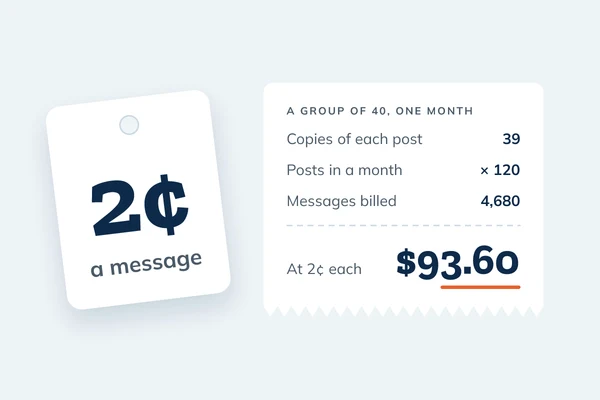
Every service that sends real texts counts the same way, because that is how the phone network carries them: an announcement to 150 people is 150 texts. One text holds about 160 English characters. A longer announcement is split into parts and each part counts for every person, and a single Hebrew letter or emoji shrinks each part to about 70 characters. So a two-part announcement to 150 people is 300 texts.
A month is the number of announcements times the list. A list of 150 that hears from you a few times a week, about 12 announcements a month, uses about 1,800 texts; daily announcements to the same list use about 4,500. Replies are where services differ: some include incoming texts free and some count them. On Klal Chat, a reply to the admins counts as one text coming in plus one for each admin who gets it.
Services build the bill around that count in different ways: credits per copy in monthly bundles, a price per copy with a monthly minimum or a number fee, or a flat plan with the number inside it. Compare a month against a month, at your list size and your pace, rather than a price per message against a price per plan.
Klal Chat sells one flat plan per group. This is what common announcement lists come to on our current plans:
| People on the list | Light: about 12 a month | Daily: about 30 a month | Frequent: about 60 a month |
|---|---|---|---|
| 25 | $19 300 texts: the 1,000-text plan | $19 750 texts: the 1,000-text plan | $39 1,500 texts: the 2,500-text plan |
| 50 | $19 600 texts: the 1,000-text plan | $39 1,500 texts: the 2,500-text plan | $72 3,000 texts: the 5,000-text plan |
| 100 | $39 1,200 texts: the 2,500-text plan | $72 3,000 texts: the 5,000-text plan | $105 6,000 texts: the 7,500-text plan |
| 200 | $39 2,400 texts: the 2,500-text plan | $105 6,000 texts: the 7,500-text plan | $165 12,000 texts: the 12,000-text plan |
| 300 | $72 3,600 texts: the 5,000-text plan | $165 9,000 texts: the 12,000-text plan | $275 18,000 texts: the 20,000-text plan |
Replies to the admins, in a group that turns them on, count on top: one text for the reply and one for each admin who gets it. Where a list needs more than the largest plan, its figure includes the extra texts in packs of 1,000, at the price the pricing page charges for that many.
Work out your own list's plan →How to write announcements people keep reading
A text list lives or dies by whether people keep reading it. The lists that stay read share a few habits:
- Lead with the change. "No school Tuesday, snow" beats a greeting, and on a small screen the first line is often all that shows.
- Put what, when and where in one text. If it needs three texts, it is probably two announcements, or one shorter one.
- Write addresses, times and phone numbers out in full. A link or a photo may not open on a basic phone, and many people will never tap it.
- Say how to answer: "Reply to this text and the office will see it", or "Please don't reply here, call Rachel at the office".
- Correct once, and say so. Start with "Correction:" and give the whole right version, not just the changed word.
- Keep a steady pace. A list that sends a few useful texts a week gets read; one that sends ten a day gets muted.
- Send at a decent hour. Schedule a late-evening thought for the next morning instead of sending it at midnight.
- Sign it if the tool does not. On a group line the admin's name is already in front; on a broadcast tool, end with who it is from.
How to set up an announcement group on Klal Chat
If a group line fits your list, this is the whole setup:
- Start a group from the pricing page, using the Announcements tab to size the plan to your list and your pace. The group gets its own number.
- In Settings, under who can post, choose admins only. Then decide whether members' replies should reach the admins, and whether the admins should hear about each person who joins.
- Make the other senders admins on the member list once they have joined. Each can then post from their own phone.
- Invite people: text #add with a name and a number to the group's number, add them on the member list, or share the join code so they can text JOIN and the code themselves. Nobody is on the list until they have said yes.
- Send a test announcement with another admin and the simplest phone you have on hand, and check the delivery log.
- Send the first real announcement, and say in it how members should reply.
Plans, with the Announcements picker · Texting commands for members and admins
Moving an existing list without losing anyone
Most lists already live somewhere: a phone's group text, a spreadsheet, an app group. Moving one is list work more than technology:
- Write down everyone on the old list with a name, a confirmed number, and whether that phone can receive an ordinary text.
- Set up the new list and test it with two or three people, including the simplest phone on the list.
- Announce the move on the old channel: the new number, how to join, the date the old one stops, and who to ask. Write it out in full for anyone who cannot open a link.
- After a few days, invite the people who have not joined, and call the ones who still have not.
- Keep the old channel until the first real announcement has landed on the new one, then retire it with one last message.
Questions about this guide
Can members reply to an announcement group?
It depends on how the group is set. In a one-way group a reply goes nowhere, and a good service tells the member so. In a group that sends replies to the admins, a member's answer reaches the admins only, with the member's name on it. In an open group a reply reaches everyone. On Klal Chat the person who runs the group can move it between all three at any time, on the same number.
Can people on an announcement list see each other's phone numbers?
Not on a service that sends each copy from its own number. On a phone's own group text, everyone sees everyone's number. In a Klal Chat announcement group, members see only the group's number and the admin's name, and the member list is open to the admins alone.
Can I send announcements from a flip phone?
On a group line, yes: an admin texts the group's number from any phone that can text, and the announcement goes to everyone. Most broadcast tools are run from a website, so the sending happens on a computer or smartphone even when every member receives a plain text. On Klal Chat the group is set up once in a browser; after that an admin can post, schedule, add and remove people, and check the texts left, all by text.
How many people can be on a text announcement list?
Klal Chat has no limit on members. A bigger list uses more texts, one per person for each announcement, and takes longer to go out, because the phone companies accept texts at a set pace: a few hundred people take several seconds, a thousand most of a minute. A phone's own group text is limited by the phone and the carrier, and other services set their own limits, often by plan.
Can an announcement group send pictures, polls or voice messages?
Some broadcast tools can: Moiduah, for example, advertises polls, picture messages and voice broadcasts. Klal Chat sends text only, because a picture does not arrive on every phone and the simplest phones on a list are the ones that miss it. For a quick head count, a group that sends replies to the admins can ask the question and collect the answers as texts.
Do the people on the list pay anything?
Not to the service. Announcements and replies count as ordinary texts on each member's own phone plan, which for most people is unlimited. Whoever runs the group pays for its plan, and on Klal Chat members can chip in toward it by card if the group wants to share the cost.
Sources and further reading
- Moiduah: features and pricing
- Apple: send a group text message on iPhone
- Google Messages: group conversations and mass texts
- WhatsApp: events and replies in community announcement groups
- Remind: who can send texts on Remind Chat
- Textedly: how replies are captured
- SimpleTexting: BCC text messages
- Klal Chat pricing and free trial
- Klal Chat FAQ
- Klal Chat text commands
External product details were checked for this review. This guide is written by Klal Chat; GroupMe and WhatsApp are separate services, with no affiliation or endorsement implied.
Bring your group's needs to us
Tell us about your members' phones and how your group talks. We can help you plan the switch.